
One-click scenarios
Group the services of a flow into a scenario and start or stop the whole thing with one button. Start order, health and dependencies sorted for you.
What a scenario isLocal microservice orchestrator
Every dependency points wherever you say: at the service you have open, at the cloud —your shared dev environment— or at a mock. MicroLab rewrites the URLs as it starts everything, so you never touch a line of your repositories.
On start · MicroLab injects these URLs into each service
LOCAL_SETUP.md to one clickBuilding a local microservice environment is slow, brittle and hard to repeat. MicroLab turns it into something visual, reproducible and non-invasive. Why it exists and who builds it.
A tool built for teams working with a lot of microservices.
Group the services of a flow into a scenario and start or stop the whole thing with one button. Start order, health and dependencies sorted for you.
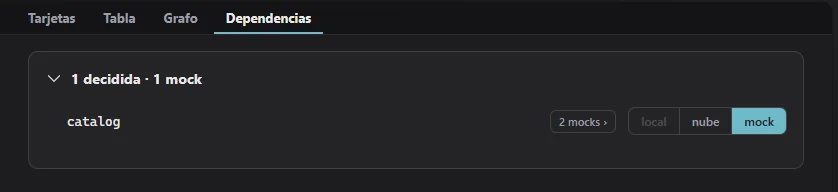
What a scenario isFor every connection you choose whether it points at the real service running locally, at the cloud (your shared dev environment) or at a mock. MicroLab rewrites the URLs automatically, with no edits to your repositories.
How each dependency is resolvedMixed mode: the service you are working on runs natively, fast and with hot reload; the ones you only need in the background run isolated in Docker. You decide per service.
Native or containerised“Add service” detects the stack, the ports, the infrastructure and the dependencies from the repo. Zero manual configuration to get going.
The manifest and the stackCapture calls and turn them into stubs in one click, generate response skeletons from OpenAPI and organise variants per service. With hot reload, Postman-style.
Mocks in the app
Kafka, Redis and PostgreSQL run in Docker, managed by the app, remapping ports automatically when
they collide. No hand-written docker compose.
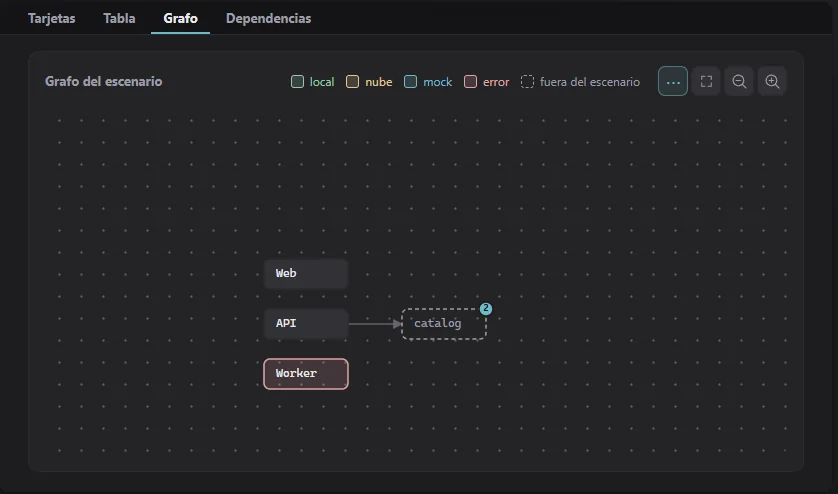
Live logs colour-coded per service, with search and follow-tail; health on every card, and a navigable graph of the scenario to see who talks to whom.
Live logs
Everything the UI does, the microlab CLI does too. Automate scenarios in CI or from
your terminal, running the same engine logic.
microlab CLI Import and export self-contained scenarios to share with your team. The same environment, reproducible on any machine.
Sharing a scenarioFrom nothing to a running scenario in four steps. If you are still deciding how to build it, the guide explains what a local microservice environment needs and what each approach solves.
Point at the repo folder. MicroLab detects the stack, the ports, the infrastructure and the dependencies automatically.
Adding a service, step by stepChoose which services come up together and, for each dependency, whether it goes local, to the cloud or is simulated with a mock.
Your first scenarioThe app starts infrastructure and backends in the right order, rewrites the URLs between them and waits until they are healthy.
Your first runRun your whole flow. Follow the live logs, check health and edit mocks on the fly without restarting anything.
Activity and checksA scenario actually running: which service is healthy, where each dependency points and what is happening right now.
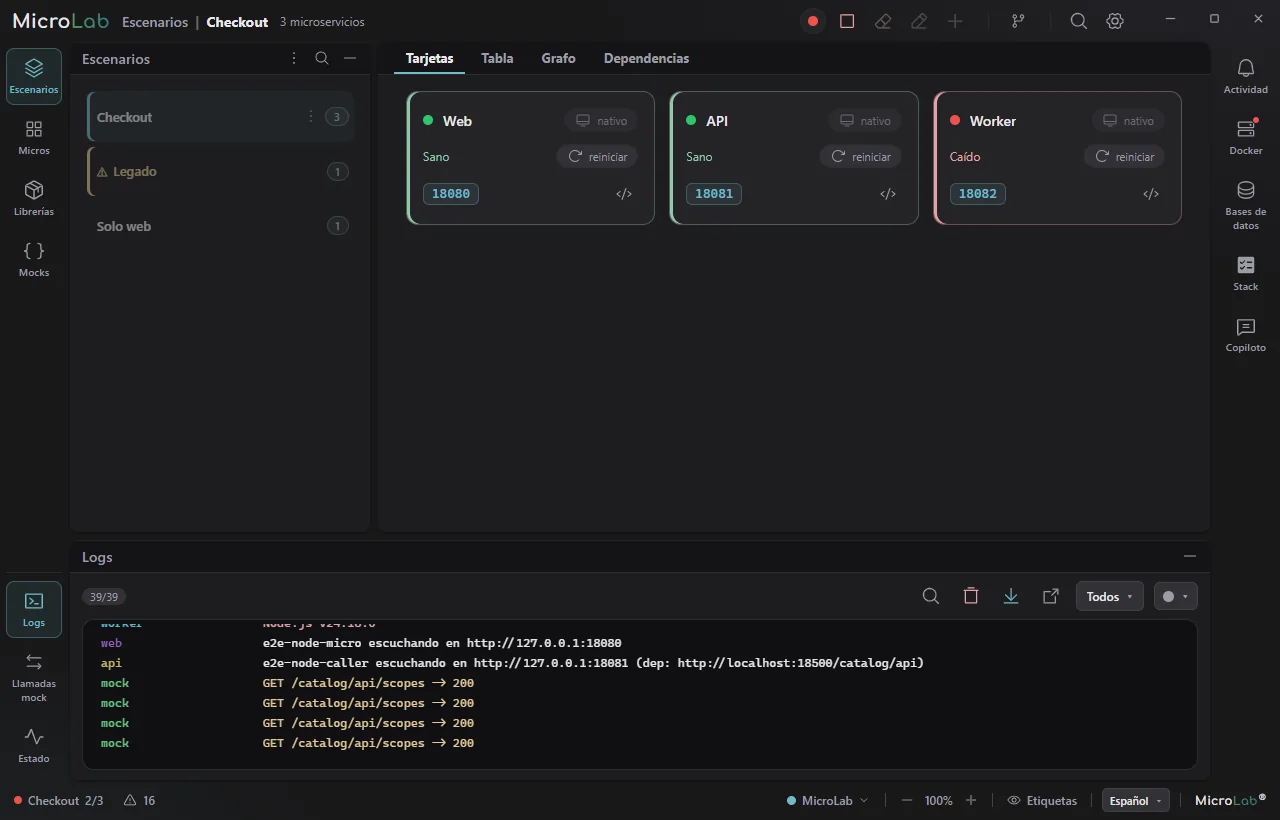
The engine carries no logic for any particular stack: that knowledge lives in declarative profiles. Adding a technology means adding a profile, not rewriting the orchestrator.
Free for personal use — the window and the CLI, whole, with a daily allowance of AI calls to try it out. Using it at work, or without the AI limit, needs a paid plan.
All of MicroLab, by hand.
The window and the terminal, uncut. The microlab CLI carries the same engine logic and
full parity with the app, in CI too.
Let the AI build it.
A copilot assembles and runs scenarios for you: describe the flow in plain language and let MicroLab orchestrate it, with a built-in chat and an MCP server for your own agents.
The same environment, for everyone.
A catalogue of scenarios the team shares: whoever joins clones it, starts it
and is already working, without reading anybody's LOCAL_SETUP.md.
Beta First public beta. Not signed yet: your OS may warn about an unverified app.
.exe installer · Windows 10/11 (x64)
The macOS installer will follow.
Coming soonAppImage · .deb
.deb package
No. MicroLab is non-invasive: it injects configuration as each service starts
(-D flags or environment variables) and rewrites the URLs between services,
without touching the code or the files in your repositories.
The engine is stack-agnostic: it uses a declarative registry of profiles. Today it runs JVM (Quarkus, Spring Boot) and Node/Angular; .NET, Python and Go are ready. Adding a technology means adding a profile, not touching the orchestrator.
Yes. For each dependency you decide whether to resolve it locally, against the shared development environment (VPN where needed) or with a mock. That is the point of MicroLab: testing the part you care about without bringing up everything else.
Kafka, Redis and PostgreSQL in Docker, managed by the app itself, remapping ports automatically when they collide. You need Docker Desktop (or a Docker engine) installed.
You can download it now: there are beta installers for Windows and Linux, and the macOS one will follow. It is free for personal use —learning, evaluating, your own projects—; using it at work requires a paid plan.
Yes. Scenarios export as self-contained, importable files, so the whole team brings up exactly the same environment, reproducibly.
Download the beta and have your microservice scenario running in minutes.
See downloads